· revised July 24, 2026
Anatomy of a durable agent run using Temporal
A deep dive into how a durable agent run works, using Temporal and Pydantic AI
Durable execution lets an agent run survive worker crashes, deploys, rate limits, and other interruptions without starting from zero. In this post, I break down what a durable agent run actually is, how Temporal records and replays it, and what happens when a worker dies halfway through.
GPT 5.6 Sol was used to assist me in writing this post.
Introduction
Your agent works. It plans, calls tools, and writes the report.
Then you ship it, and one day it dies halfway through. A deploy restarts the container. The model provider rate-limits you. The worker crashes after twenty model calls.
Without durable execution, the run usually dies with the process. Its intermediate decisions lived in memory, so restarting means starting over: repeating model calls, repeating tool calls, and potentially repeating side effects.
A durable agent run is different. It is one agent execution whose progress survives the process executing it.
The run may span several model requests, tool calls, retries, and human interruptions. Some worker has to execute those steps, but the state of the run cannot belong only to that worker. Otherwise, killing the worker kills the run.
That matters because agent runs are increasingly:
- long enough to outlive a single request,
- expensive enough that replaying everything is wasteful,
- and stateful enough that blindly repeating a step can be dangerous.
Durability means the run can continue from its recorded progress instead of pretending nothing happened.
Temporal is one of the prominent names behind this model: a $300M Series D in February 20261, Replit’s agent running on it2, and OpenAI and Lovable on its user list (their claim, not mine).
It now also integrates with most of the agent orchestration frameworks you would expect:
- Pydantic AI shipped native support in November 20253
- OpenAI Agents SDK integration went GA in March 20264
- LangGraph got an official plugin in July 20265
So apparently “durable” is everywhere now.
But what does it actually mean during one agent run?
Instead of starting with another framework comparison, let’s make a run durable, kill it halfway through, and inspect what survives.
1. What Temporal adds
You can skip directly to Setup for the hands-on code. This section explains what Temporal is doing underneath it.
Temporal is not the agent itself. It sits around your code and gives the run a durable history.
The split is simple:
- The Temporal server stores the run’s event history, queues work, and tracks retries.
- Workers run your code: the agent loop, model requests, tools, and every other side effect.
The server does not execute your workflow code, the worker does, and that separation is important because a worker can disappear and the state can continue since is not trapped inside its memory.
Workflows and activities
Temporal divides execution into Workflows and Activities.
A Workflow coordinates the run. Its code must be deterministic: given the same recorded history, it must reach the same decisions.
An Activity performs the non-deterministic work: model requests, tool calls, database writes, HTTP calls, or anything else whose result may change between executions.
Now you might be asking yourself:
How can Temporal replay a workflow containing LLM calls when the model may answer differently every time?
Thing is, it does not make the LLM call again.
Temporal re-executes the deterministic workflow code from the beginning, but completed activity results are already stored in the event history. When replay reaches one of those activities, Temporal gives the workflow the recorded result instead of executing the activity again.
When it reaches an activity that never completed, that activity can be scheduled again according to its retry policy.
So replay does not mean repeating the entire run:
- if the activity completed -> return its recorded result,
- but if the activity was interrupted -> then execute it again,
- otherwise (workflow logic) -> replay deterministically around those results.
One caveat to state up front: this is at-least-once execution, not exactly-once. This means that an interrupted activity re-runs from zero, so a tool that already fired a side effect (charged a card, sent a webhook) can repeat it on retry. Anything non-idempotent still needs its own idempotency key or dedup.
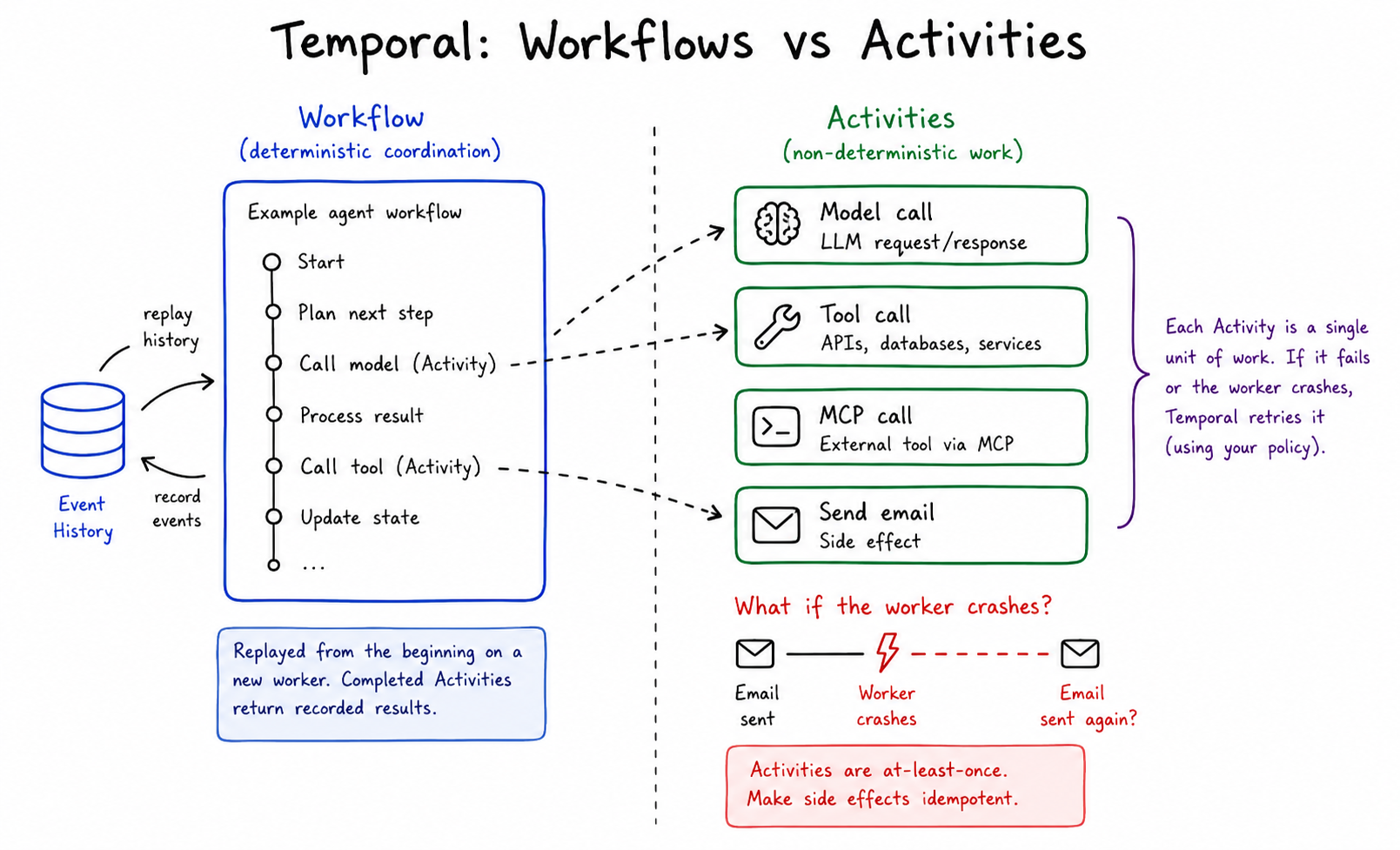
Workflow vs. activities. Every completed activity’s result lands in the event history.
How work reaches a worker
There is one more piece to understand before touching the code: Temporal dispatches work by name.
- A client asks the Temporal server to start a workflow, providing a workflow type and a task queue.
- The server records the request and places work on that queue. It does not load your code or verify that the workflow exists.
- A worker polling that queue receives the task and looks for the workflow type among the workflows registered inside that worker.
- If the name matches, the worker runs it. If it does not, the task fails and Temporal keeps retrying while the workflow remains open.
[!check] Note The client does not need to stay alive after submission. The worker that eventually executes the run does not need to be the worker that started it either.
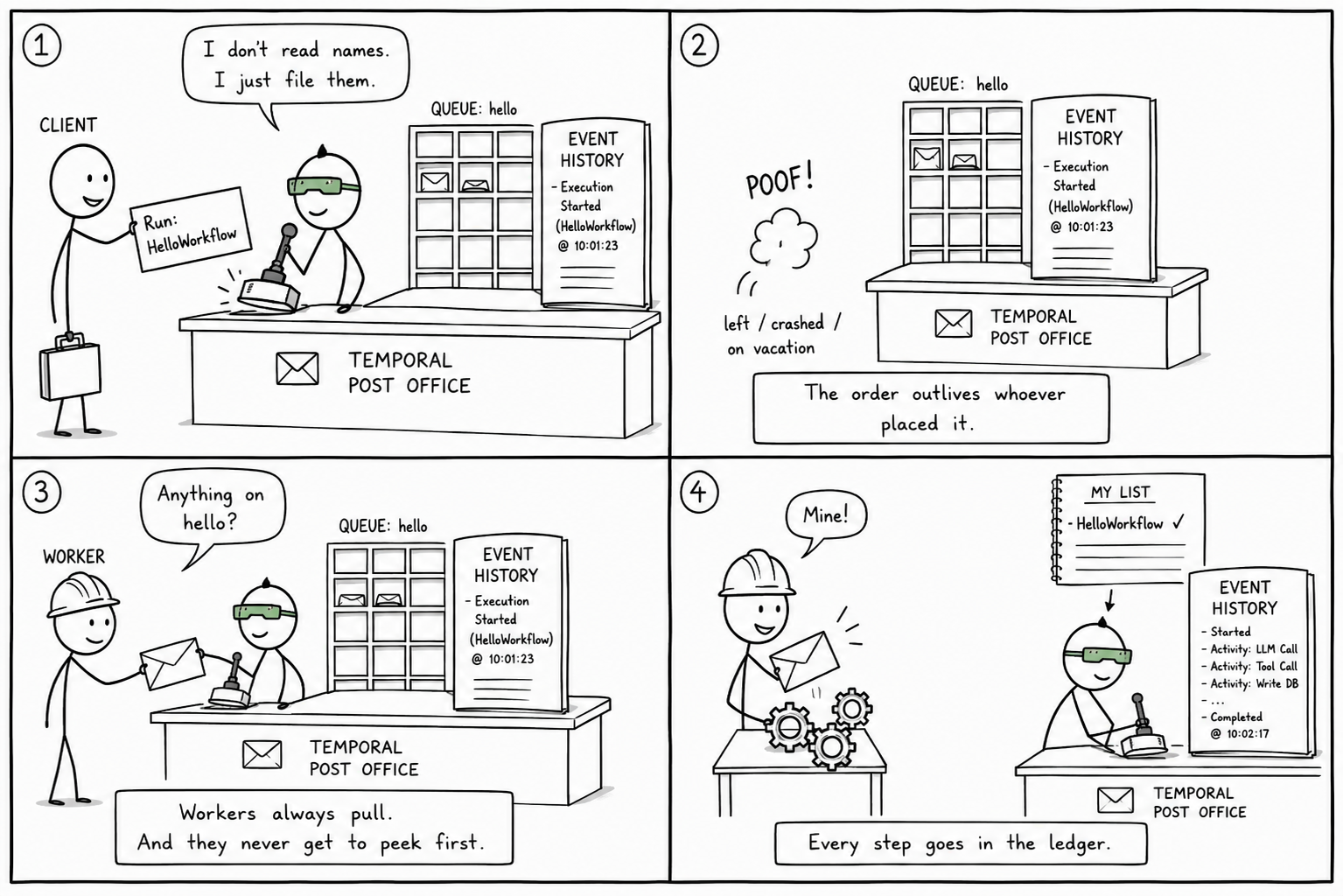 Scenario A. The run name matches what the worker expects.
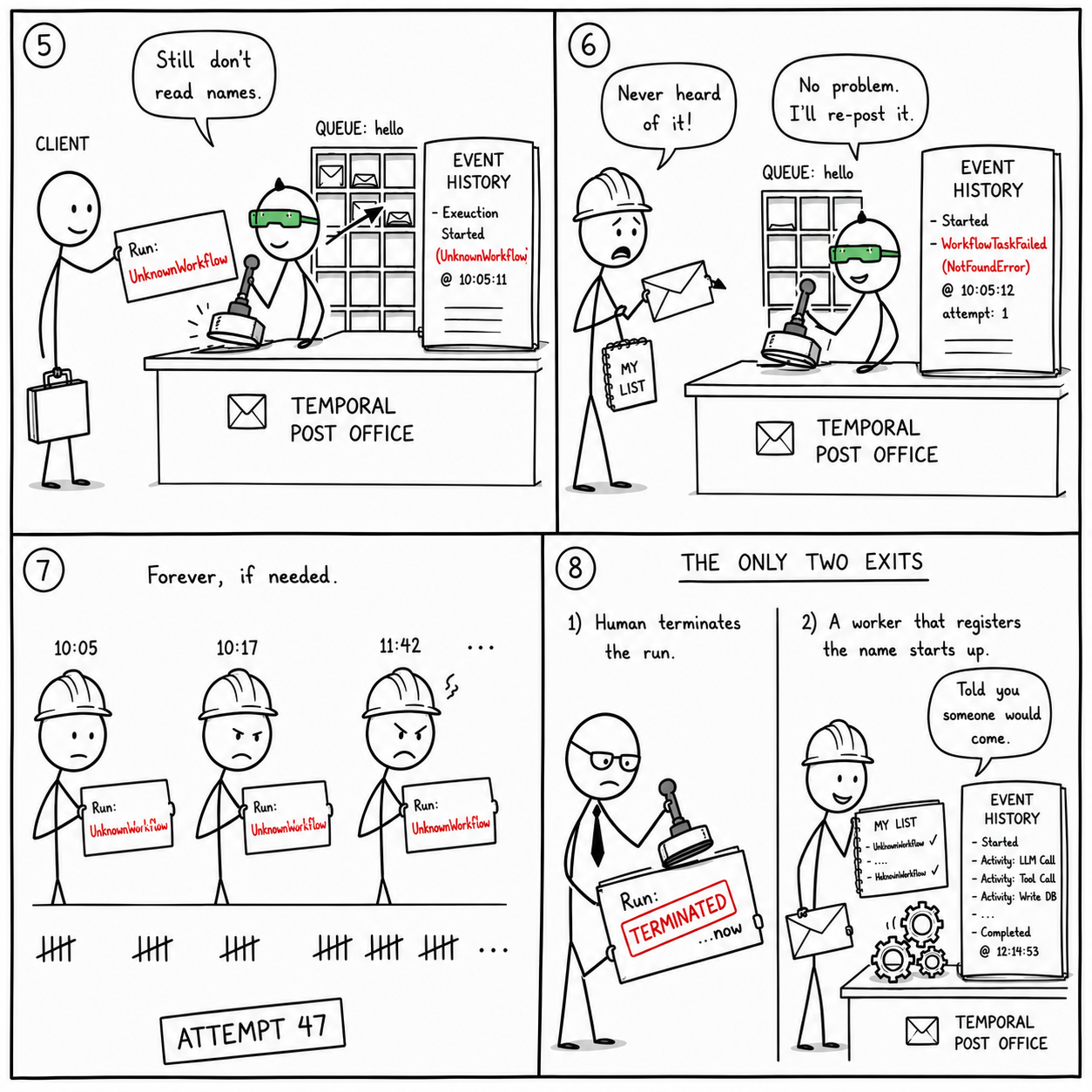 Scenario B. A typo in the name loops on WorkflowTaskFailed forever
2. Setup (in 60s)
It is worth watching what durable execution looks like during one boring, successful run before we start breaking things.
So we’ll keep the setup small: one agent, one tool, and the history they leave behind.
Everything below is reproducible locally in a few minutes.
[!check] We’ll use Pydantic AI with Temporal because the integration is native and mature by now.
You can find all the code files in the GitHub repo.
1
2
3
pip install "pydantic-ai[temporal]"
export OPENAI_API_KEY="sk-..."   # + OPENAI_BASE_URL if you use a gateway
docker run --rm -p 7233:7233 -p 8233:8233 temporalio/temporal:latest server start-dev --ip 0.0.0.0
[!info] Note The dev server keeps everything in memory, if you stop the container your histories are gone.
Add
--db-filename temporal.dbif you want runs to survive restarts.
Next, define one agent with one tool and give it the Temporal durability capability:
1
2
3
4
5
6
7
8
9
10
11
12
13
14
15
16
17
18
19
20
21
agent = Agent(
    "openai:gpt-5.2",
    instructions="You are a concise SRE assistant. Use your tool when asked about servers.",
    name="hello",  # required for durability, and must stay stable: it names the activities
    capabilities=[TemporalDurability()],
)

# a dummy tool
@agent.tool_plain
def get_server_status(region: str) -> dict:
    """Return the current status of the demo server in the given region."""
    return {"region": region, "status": "degraded", "open_incidents": 2}

@workflow.defn
class HelloWorkflow(PydanticAIWorkflow):
    __pydantic_ai_agents__ = [agent]

    @workflow.run
    async def run(self, prompt: str) -> str:
        result = await agent.run(prompt)
        return result.output
The durability lives on the agent now, through the TemporalDurability capability, so the same agent object runs directly inside the workflow. No separate wrapper to keep in sync.
Two more files complete the setup:
worker.py: the long-running process that executes the workflow and its activities.run.py: the client that submits a workflow request and waits for the result.
The Temporal server sits between them.
It never runs the agent code. It records what the worker does and sends queued work to whichever worker is polling the correct task queue.
If you submit a run before starting the worker and nothing is lost. The run simply remains pending in the UI until a worker appears.
[!check] After running
run.pyandworker.py, open Temporal’s UI athttp://localhost:8233and inspect the run’s event history.
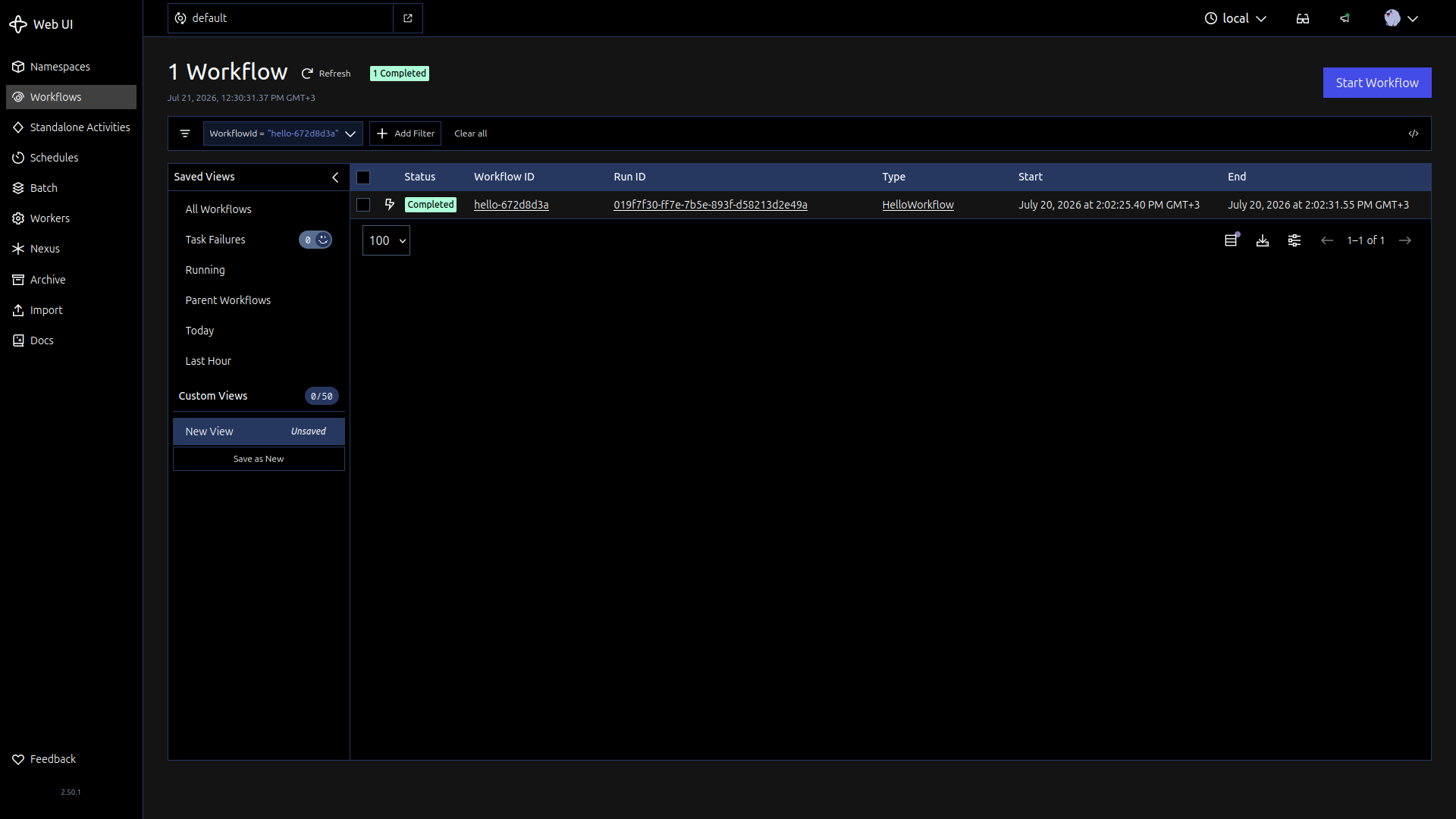 The first run.
3. Reading the history
Click on the run.
Ours contains 23 events following one repeating pattern:
- a Workflow Task, where the worker runs the deterministic agent loop and decides what should happen next;
- an Activity Task, where the non-deterministic work actually happens: a model request or a tool call.
For example, events 1–3 are a Workflow Task being scheduled, started, and completed. Events 5–7 are an Activity Task going through the same lifecycle.
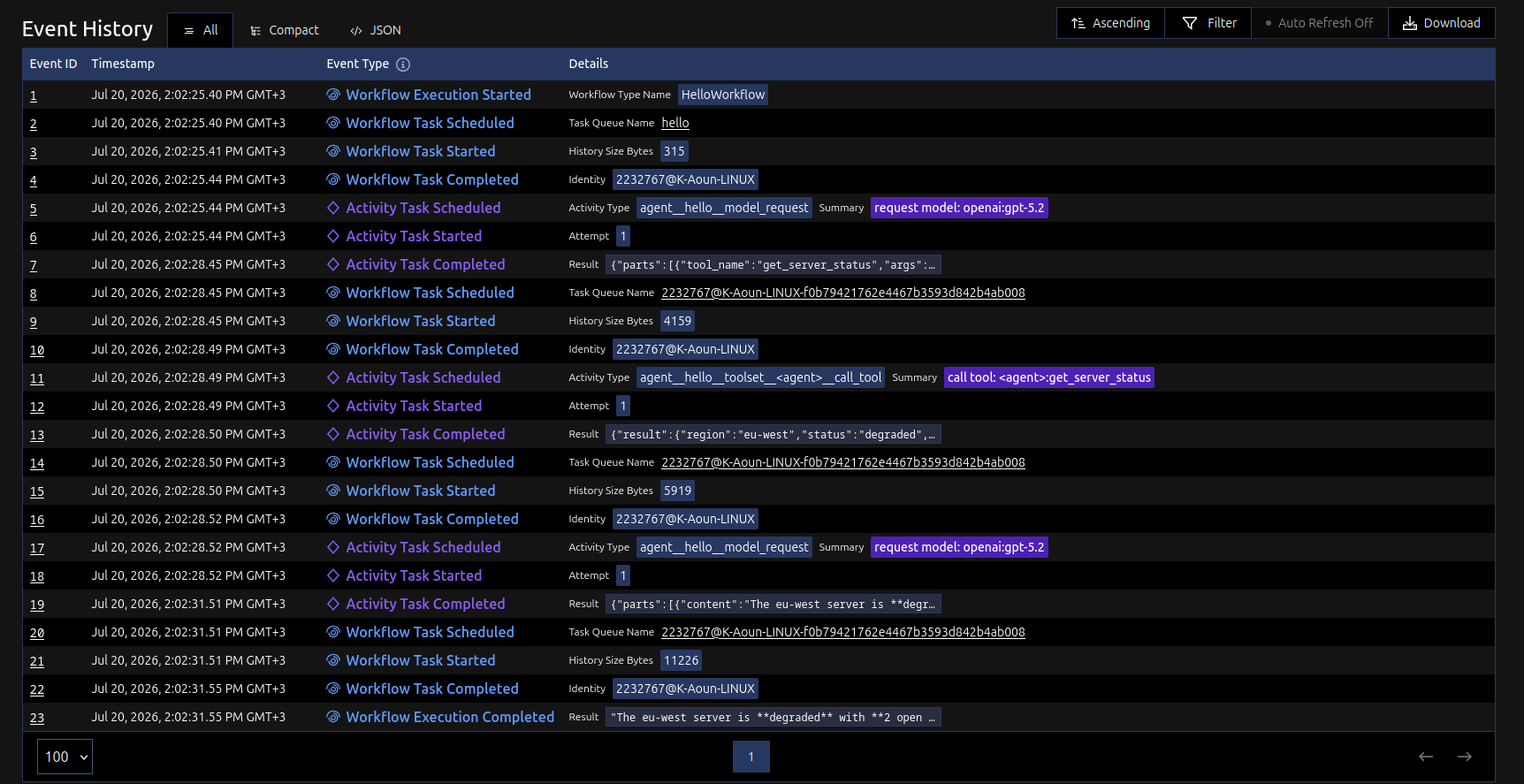 The whole run, as Temporal recorded it: 23 events, three activities, everything on Attempt 1.
[!example] Read it as a conversation:
- Events 1 to 4: The run starts. A worker picks it up. The agent loop decides to ask the model.
- Events 5 to 7: Activity
agent__hello__model_requestruns. Event 7 records the model’s decision to callget_server_status.- Events 8 to 10: The agent loop receives that result and decides to execute the tool.
- Events 11 to 13: Activity
agent__hello__toolset__<agent>__call_toolruns. The tool’s return value is recorded.- Events 14 to 16: The loop decides to send the tool result back to the model.
- Events 17 to 19: The second model request runs, and its final text answer is recorded.
- Events 20 to 23: The loop decides it is done. Event 23 stores the workflow’s final output, queryable by workflow ID until retention expires (72 hours by default after the run closes).
[!info] The history is also stored data Event history holds the model inputs and outputs and every tool payload, in plaintext, for the whole retention window. If any of that is sensitive, encrypt it with a Temporal payload codec before it leaves the worker. Durability is not the same as safe to store.
All in all, the agent made two model calls and one tool call.
Each call became its own activity, with its own input, output, retry policy, and attempt counter.
During a successful run, every counter stays at Attempt 1. The important part is that the counter and its retry schedule live in Temporal’s history, not in the worker’s memory.
Hold that thought.
Activity names also include the agent name. Because our agent is named hello, its model request activity is named agent__hello__model_request.
[!check] That is what granularity means here: Temporal records and retries the individual call, not the whole agent run.
[!info] Note Event 4 contains
2232767@K-Aoun-LINUX: the PID and hostname of my worker.That is concrete evidence of the division of labor. The server coordinates and records; the code, credentials, and model traffic remain on the worker.
[!error] Important An agent name is normally optional in Pydantic AI, but the Temporal integration requires one. Each activity needs a stable, unique name so Temporal knows which code should handle it after an interruption, including when the worker code has changed between attempts.
The same applies to toolset IDs. Renaming one after deployment can break active workflows because their histories still reference the old activity names. A renamed agent no longer matches its own recorded history during replay.
See the Pydantic AI Temporal integration documentation for more details.
4. Now we kill the worker
Everything above was the happy path.
The promise of durability is that the run survives the unhappy one, so let’s kill its worker halfway through.
Start another run with a longer prompt to widen the interruption window:
1
python run.py "Check the eu-west server status, then write a detailed 300-word incident report about it."
While it is running, press Ctrl-C in worker.py. Then open the run in Temporal’s UI:
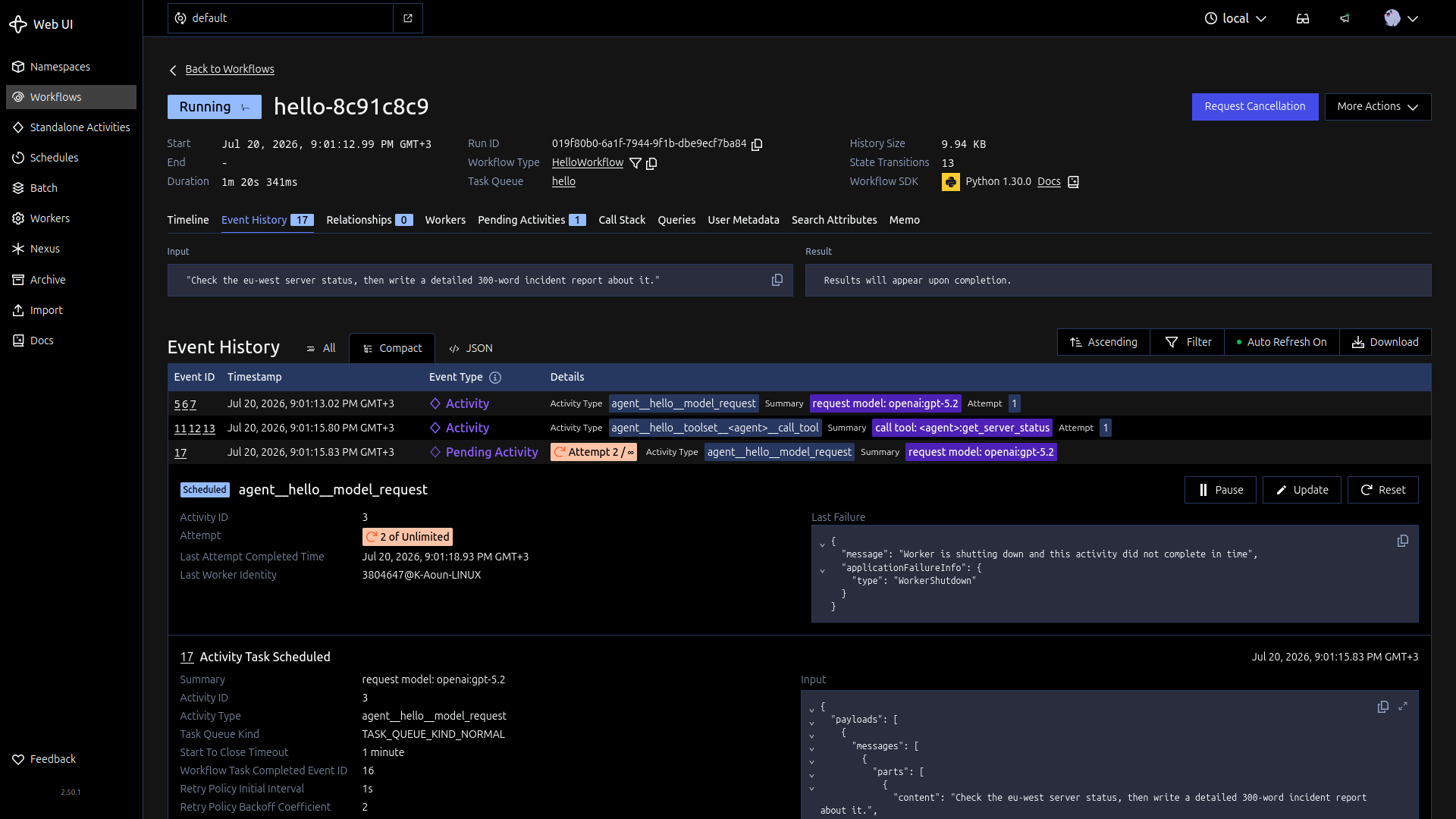 The run is not dead. It is waiting: Attempt 2 of Unlimited.
Three things are worth noticing:
- The completed activities are untouched because their results are already in the history.
- The interrupted model call is now a Pending Activity, with Attempt 2 of Unlimited and the failure reason recorded.
- The attempt counter is frozen while no worker is available. Retries only happen when a worker actually receives and attempts the activity.
[!ship] You can take a break here, the run will wait. maybe grab a coffee or something (that’s what I did)
Now restart the worker:
1
python worker.py
The run completes within seconds. Temporal replays the workflow, feeds it the recorded results (no completed call re-runs), and re-executes only the interrupted activity, from zero.
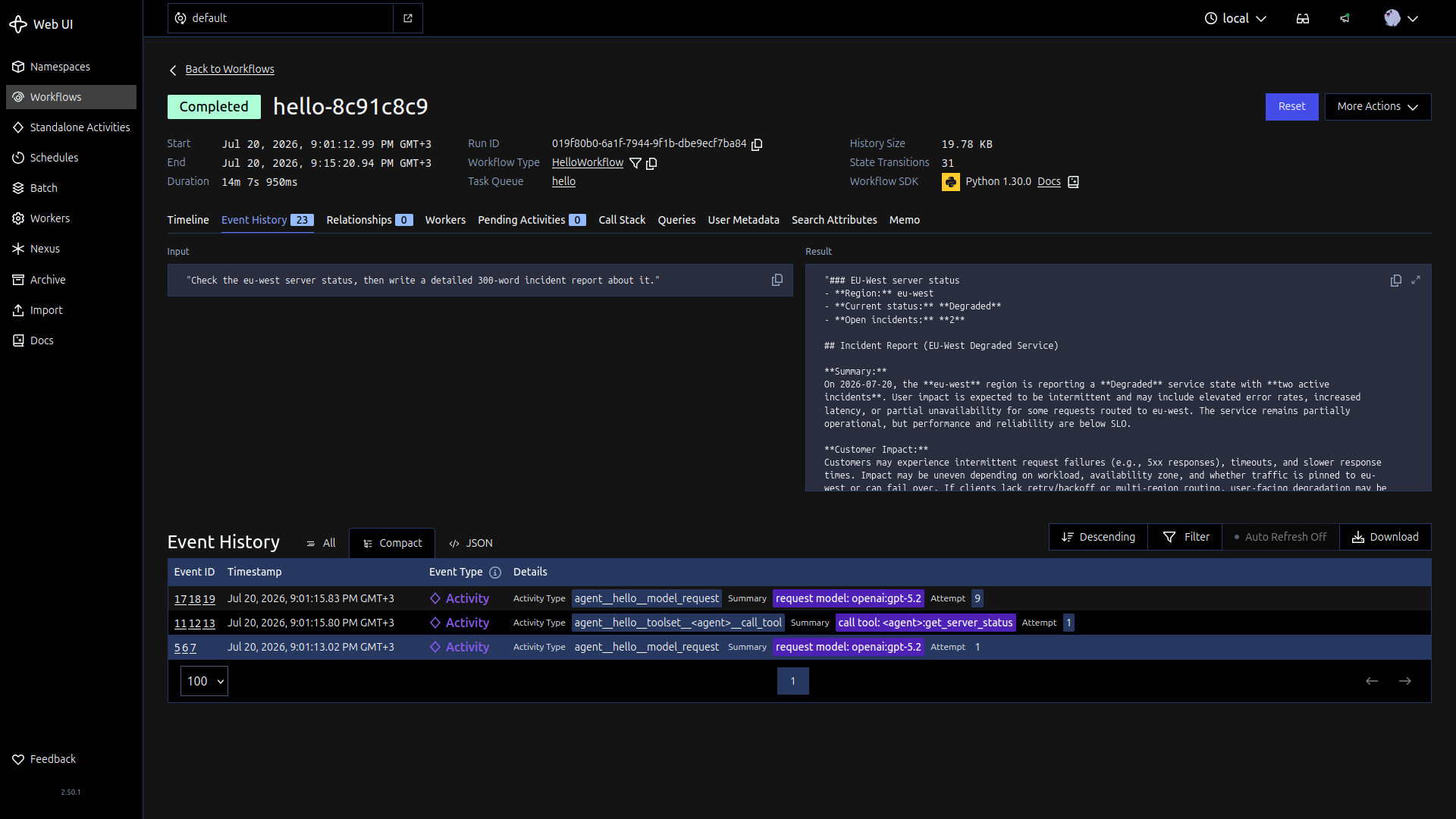 Same run, completed. Only the interrupted activity re-ran.
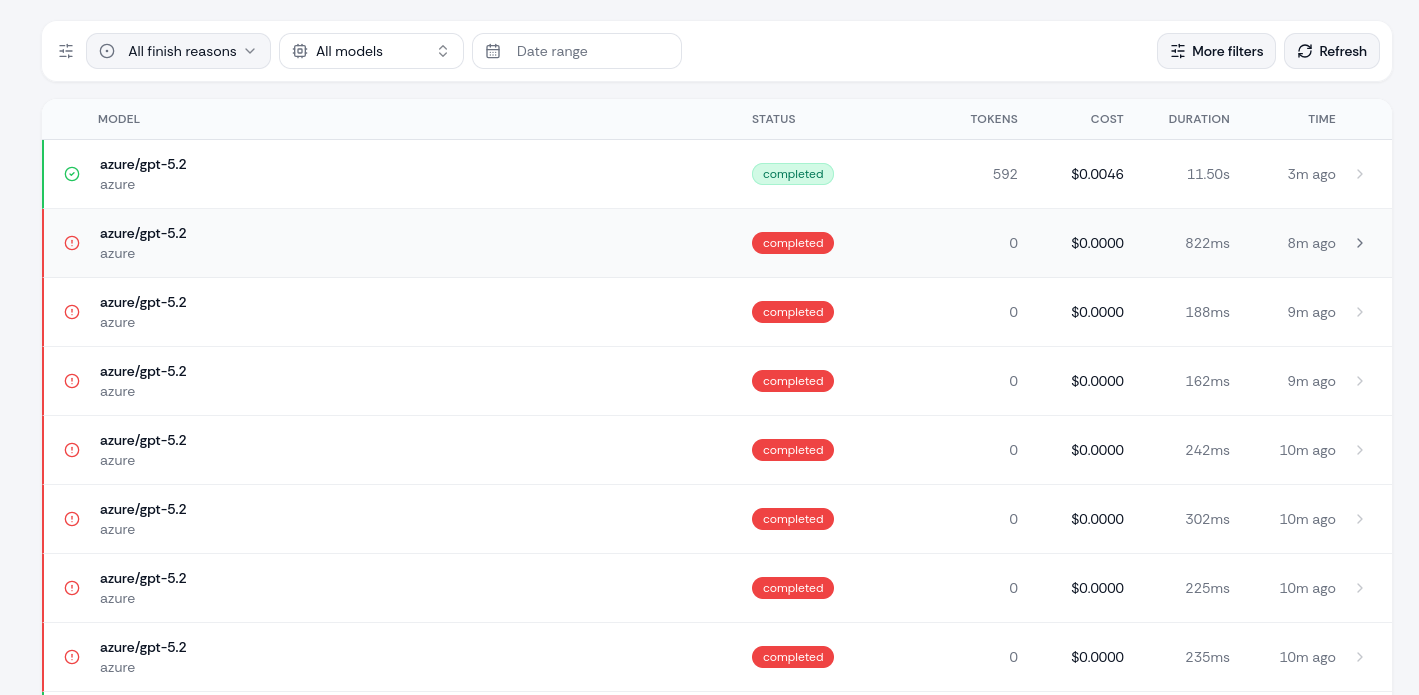
[!info] Why does ours say Attempt 9? You would expect to see Attempt 2, not 9. The reason is my LLM gateway apparently had a bad evening and kept rejecting one request with a 400.
Temporal retried until the gateway recovered. But a 400 is usually a permanent client error, not a blip, so retrying it forever mostly burns tokens. The honest fix is to cap attempts or mark some error types non-retryable, and save unlimited retries for genuinely transient failures. When infinite retries are the wrong answer is a whole post on its own, so more on that next time.
[!check] The takeaway The run’s life is not tied to any process. State lives on the server, code lives on workers, and workers are replaceable mid-run.
[!info] A caveat on “deploys” Restarting the same worker code is crash recovery. But a re-deploy changes the workflow code: replay only holds if the new code makes the same decisions in the same order, so naturally code-changing deploys lean on Temporal’s versioning and patching.
Appendix
Side note I found from breaking things. Names are matched by string at runtime, and nothing validates them at start time.
If you submit a workflow with a typo in its type name, the server accepts it, the worker receives it, rejects it as unregistered, and the server retries it forever.
The run just sits Running, accumulating WorkflowTaskFailed events, waiting for a worker that knows the name. This is actually deliberate: during a rolling deploy, “code not registered yet” is a temporary condition, so Temporal waits instead of failing the run.
A renamed agent is the same class of problem one level down: its activities get new names, so a run already in flight no longer lines up with the activity names recorded in its own history. A different failure from the workflow-type typo above, but the same lesson: the name is the contract.
If you misspell the task queue instead, the task is never picked up at all.
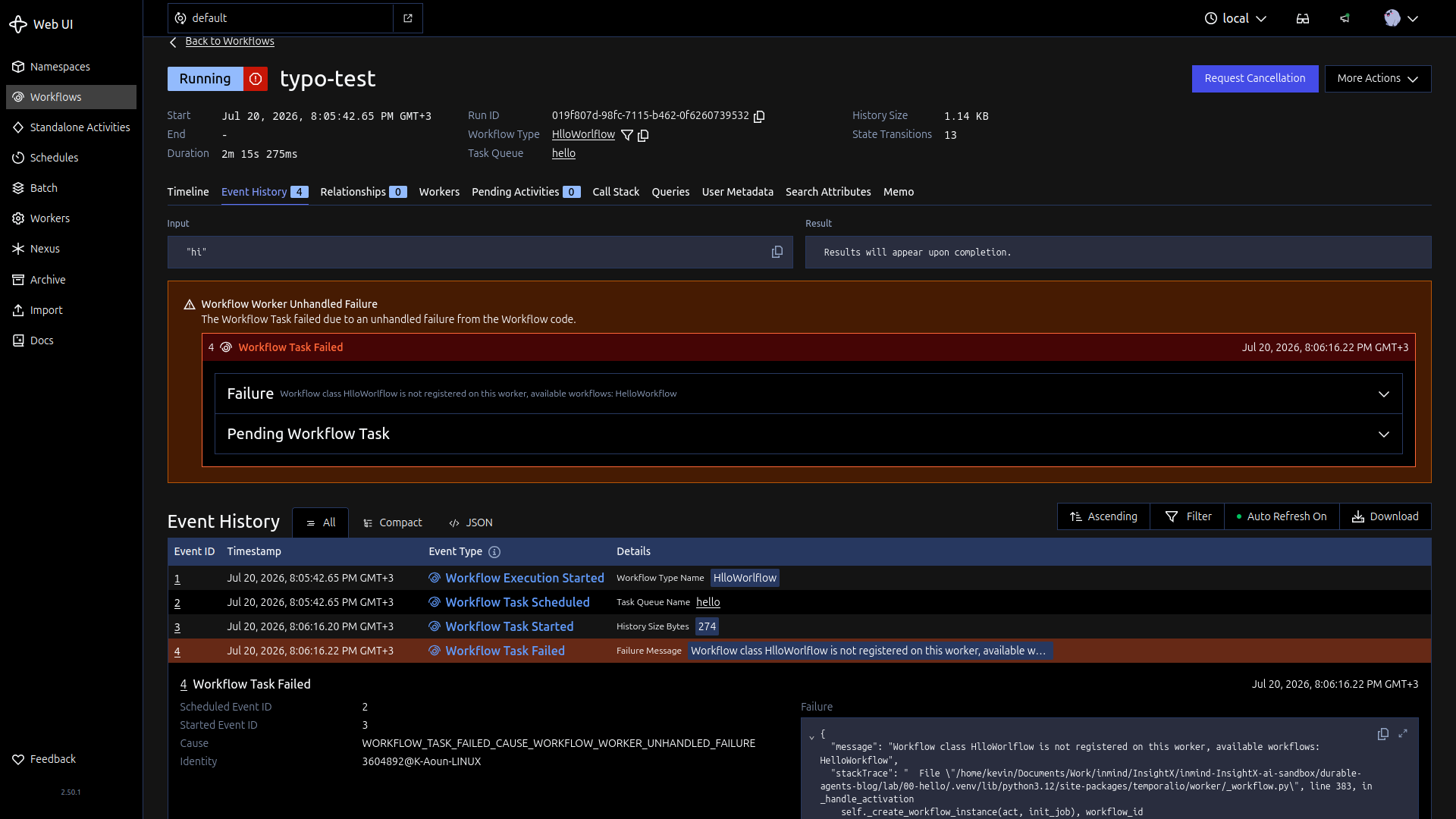 The typod run: accepted by the server, rejected by the worker, retried forever.
Note to self: why the server refuses to validate names (design rationale).
- Patterns: competing consumers (pull-based work queue), smart endpoints / dumb pipes (domain knowledge only at the edges), event sourcing (server stores facts, not opinions), late binding (names resolve at dispatch, not at submission).
- The server never holds code, deliberately: Code, dependencies, keys stay on workers
- A server-side type registry would be stale by construction (workers boot, die, and deploy continuously), and start-time validation is a TOCTOU trap: passing the check guarantees nothing at execution time
- Precedents in the same pattern: RabbitMQ does not validate consumers can parse messages; Kafka brokers do not know schemas (Schema Registry is a separate optional component); load balancers do not know whether backends implement routes.
-
Temporal, Temporal raises $300M Series D at a $5B valuation (February 2026). ↩
-
Temporal, Replit uses Temporal to power Replit Agent reliably at scale. ↩
-
Temporal, Build durable AI agents with Pydantic AI and Temporal (November 2025). ↩
-
Temporal, Announcing the OpenAI Agents SDK integration (March 2026). ↩
-
Temporal, Temporal LangGraph plugin: durable execution (July 2026). ↩